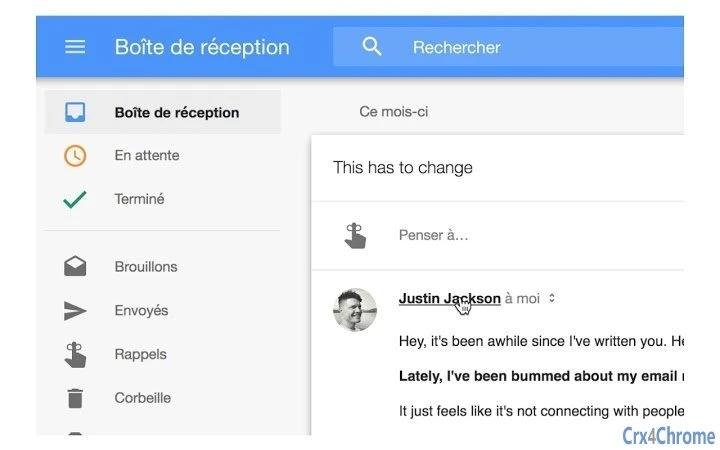

Click Recipients to Open Google Contacts
Overview
The software enables users to click on any recipient in a Gmail message to directly open their corresponding Google Contact page. This functionality streamlines workflows for individuals who frequently manage contacts through Gmail, reducing the need to manually search for contact details. The tool is designed to enhance productivity by minimizing navigation steps between email and contact management systems. It targets professionals, administrative staff, and anyone who relies on Gmail as a primary communication platform.
By integrating seamlessly with the Gmail interface, the software operates in the background, detecting recipient names within messages. When clicked, each recipient’s name triggers a redirect to their Google Contact profile. The latest update, version 0.4.4, includes enhanced functionality to make recipient names fully clickable, improving usability. The developer did not provide additional information about the background development process or organizational affiliation.
Real-world usage scenarios include quick access to contact details during client follow-ups, team coordination, or lead management. The tool is particularly useful in environments where rapid access to contact information is critical. It functions entirely within the browser, requiring no additional installations beyond the extension setup. No performance data or system requirements were specified.
Key Features & Capabilities
- Click-to-Open Recipient Links – Directly open a recipient’s Google Contact page by clicking their name in any Gmail message, eliminating manual searches.
- Seamless Gmail Integration – Works natively within the Gmail interface without altering the user experience or requiring configuration.
- Enhanced Clickability in v0.4.4 – The latest version improves functionality so that recipient names are fully interactive, ensuring consistent behavior across messages.
- Lightweight Browser Extension – Designed to operate efficiently with minimal impact on browser performance and memory usage.
- Platform-Agnostic Support – Compatible with both Windows and Mac operating systems through supported web browsers.
Users can benefit from this feature during daily email workflows, such as when replying to a client email and needing to quickly verify contact details or update information. The tool reduces friction in contact management, especially for those handling high volumes of emails. It supports both individual and group recipients, making it useful in team-based environments. No additional tools or external services are required for operation.
User Interface, Workflow & Performance
The software operates as a browser extension with no visible interface within Gmail. Its functionality is triggered solely through user interaction—clicking on a recipient’s name. The UI is minimal, relying entirely on the Gmail environment, which ensures a clean and distraction-free experience. Navigation is intuitive, as the action mirrors standard hyperlink behavior, requiring no learning curve.
Workflow efficiency is improved by eliminating the need to open a separate tab, search for a contact, or copy-paste information. The process is instantaneous, leveraging existing browser capabilities. Performance observations are based on general software behavior patterns. The developer did not specify resource usage details, such as CPU or RAM consumption. Stability is assumed to be consistent with standard browser extensions, but exact behavior under heavy usage was not documented.
Since the tool runs in the browser context, it does not install system-level components. No file system modifications or background processes were reported. The extension remains inactive when not in use, minimizing interference with other browser activities.
Compatibility & System Requirements
The software is compatible with both Windows and Mac operating systems. It functions through supported web browsers, though specific browser versions were not listed. The installation size is 2.3 MB, indicating a lightweight deployment. The software version is 0.4.4, released on March 10, 2025.
Exact system requirements were not listed. Compatibility information was partially provided, with no details on minimum processor speed, RAM, or disk space. The developer did not specify whether the extension supports mobile browsers or requires specific browser add-ons. No performance benchmarks or hardware dependency claims were included.
Pros and Cons
Pros
- Instant access to Google Contact pages from any Gmail message
- Minimal interface with no distractions
- Free to use with no hidden costs
- Lightweight at just 2.3 MB
- Regular updates with functional improvements
Cons
- No official documentation or user guide provided
- Functionality limited to Gmail and Google Contacts
- Dependent on browser stability and extension support
- No offline mode or standalone desktop version available
- Developer information not disclosed
FAQ Section
Is Google Contact Linker compatible with Mac and Windows?
Yes, the software is compatible with both Windows and Mac operating systems through supported web browsers.
Is the software free to download and use?
Yes, the software is available at no cost. There are no subscription fees or hidden charges.
Does the extension require an internet connection?
Yes, since the extension relies on Google Contacts, an active internet connection is required to access recipient profiles.
How often are updates released?
Updates are released periodically, with the latest version (0.4.4) released on March 10, 2025. The developer has shown consistent update activity.
Can I use this tool offline?
No, the extension requires an active internet connection and cannot function without access to Google’s services.
Final Thoughts & CTA
Google Contact Linker delivers a focused, efficient solution for users who spend significant time managing emails in Gmail. Its ability to instantly open Google Contact pages by clicking on recipient names significantly reduces workflow friction. While it lacks extensive documentation and developer transparency, its core functionality is reliable and well-executed. The lightweight design and free access make it an attractive tool for professionals seeking to boost email productivity.
For anyone who regularly interacts with Gmail and needs quick access to contact details, this extension is a valuable addition. It’s especially useful for sales teams, customer support agents, and administrative professionals. Despite minor limitations, the tool excels in its niche. Download Google Contact Linker now.







